
Building a Testable Network Layer with Alamofire
A protocol-oriented approach to HTTP networking in Swift using async/await, dependency injection, and proper error handling
A proof-of-concept for building offline-first iOS apps with Codable conforming models

You’re building an iOS app with a truckload of data coming in and out. You also want to make this data available even if your users are off the grid. Where do you put it? CoreData, baby!
But then, you have to think about syncing with the outside world — your remote server. You don’t want your users to pull their hair out when the internet takes a break, right? Let’s get them happy by building an offline-first app with CoreData.
I recommend cloning the project to help follow along.
/**
 * @note before getting started, this article assumes a general
 * familiarity with Swift, CoreData and SwiftUI. If you are new to either of these,
 * I HIGHLY recommend checking out the Swift course at codecademy.com,
 * and Paul Hudson's hackingwithswift.com
*/CoreData is like your home — cozy, and all your stuff is there. Remote data is like the grocery store; you go there to get fresh stuff. Problem? Imagine having to go to the store every time you need a coffee. Painful! Plus, sometimes the store is closed (read: no internet), and you get caffeine-deprived. No bueno! So, let’s bridge this gap with a cool hack.
The Codable protocol is like a magical potion that helps us decode and encode JSON. This is great for ephemeral data, but what if you want to save that data on a user’s device? Making NSManagedObjects conform to Codable is a little tricky.
First, we must give our magical potion the correct context and a sense of direction.
extension CodingUserInfoKey {
    static let managedObjectContext = CodingUserInfoKey(rawValue: "managedObjectContext")!
}
Next, we’ll create a CoreDataJSONDecoder helper to decode incoming JSON in the CoreData container view context. Remember those decoder rings in cereal boxes? This is like that, but way cooler. Our CoreDataJSONDecoder is the decoder ring that knows how to read secret messages (JSON data) and magically turn them into CoreData objects.
struct CoreDataJSONDecoder {
    let decoder: JSONDecoder
    init() {
        let decoder = JSONDecoder()
        decoder.userInfo[CodingUserInfoKey.managedObjectContext] = PersistenceController.shared.container.viewContext
        self.decoder = decoder
    }
    enum DecoderConfigurationError: Error {
        case missingManagedObjectContext
    }
}
Our decoder is now tuned into CoreData’s frequency; thanks to that managedObjectContext we gave it.
Next, we need to create our CoreData entity and make it conform to Codable.
class ItemEntity: NSManagedObject, Codable {
    required convenience init(from decoder: Decoder) throws {
        guard let context = decoder.userInfo[CodingUserInfoKey.managedObjectContext] as? NSManagedObjectContext else {
            throw CoreDataJSONDecoder.DecoderConfigurationError.missingManagedObjectContext
        }
        self.init(context: context)

        let container = try decoder.container(keyedBy: CodingKeys.self)
        let uuidString = try container.decode(String.self, forKey: .id)
        id = UUID(uuidString: uuidString)
        title = try container.decode(String.self, forKey: .title)
        subtitle = try container.decode(String.self, forKey: .subtitle)
    }
    func encode(to encoder: Encoder) throws {
        var container = encoder.container(keyedBy: CodingKeys.self)
        try container.encode(title, forKey: .title)
        try container.encode(subtitle, forKey: .subtitle)
        try container.encode(id, forKey: .id)
    }
}
Our CoreData model now wears the Codable cape. It can change into JSON and back like it’s no big deal.
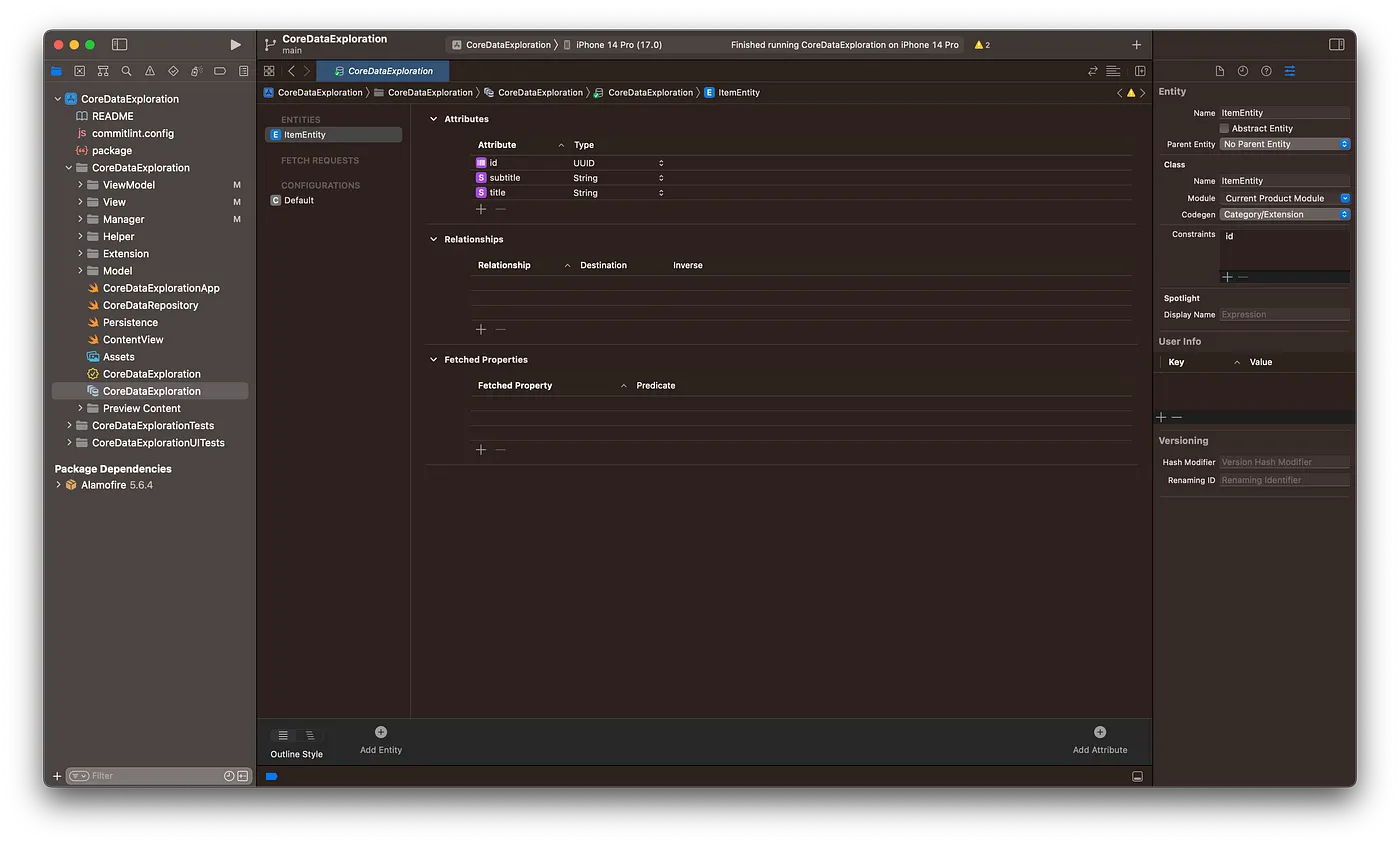
It’s also important to note the configuration of our CoreData entity. See the inspector on the right side of the following screenshot.
Let’s set up a super simple network layer to interact with our REST API. We’re going to use Alamofire in this example.
import Alamofire
import Foundation
typealias NetworkError = AFError
enum RequestStatus {
    case loading, success, failure
}
struct NetworkManager {
    private let baseUrl = "http://localhost:3000"
    private let decoder = CoreDataJSONDecoder().decoder
    struct ResponseMessage: Decodable {
        let message: String
    }
    func get<Output: Decodable>(_ url: String,
                                output _: Output.Type,
                                completion: @escaping (Result<Output, NetworkError>) -> Void)
    {
        AF.request(baseUrl + url).validate().responseDecodable(of: Output.self, decoder: decoder) { response in
            completion(response.result)
        }
    }
    func post<Input: Encodable, Output: Decodable>(_ url: String,
                                                   input: Input,
                                                   output _: Output.Type,
                                                   completion: @escaping (Result<Output, NetworkError>) -> Void)
    {
        AF.request(baseUrl + url,
                   method: .post,
                   parameters: input,
                   encoder: .json,
                   headers: [                       .init(name: "Content-Type", value: "application/json"),
                   ])
                   .validate()
                   .responseDecodable(of: Output.self, decoder: decoder) { response in
                       completion(response.result)
                   }
    }
}
Next, let’s create a view to see a list of our ItemEntities.
struct ItemListView: View {
    @StateObject var viewModel = ViewModel()
    var body: some View {
        NavigationStack {
            List {
                ForEach(viewModel.results, id: \.id) { item in
                    NavigationLink(destination: ItemDetailView(item: item)) {
                        VStack(alignment: .leading) {
                            Text(item.title ?? "-").font(.title3)
                            Text(item.subtitle ?? "-").font(.caption).foregroundColor(.secondary)
                        }
                    }
                }.onDelete(perform: viewModel.delete)
                Section {
                    Button {
                        viewModel.refreshItems()
                    } label: {
                        HStack {
                            Label("", systemImage: "arrow.clockwise").labelStyle(.iconOnly)
                            Text("Refresh")
                        }
                    }.listRowBackground(Color.clear)
                        .buttonStyle(.borderedProminent)
                }
            }.onAppear {
                viewModel.loadItems()
            }.navigationTitle("Items")
                .toolbar {
                    #if os(iOS)
                        ToolbarItem(placement: .navigationBarTrailing) {
                            EditButton()
                        }
                    #endif
                    ToolbarItem {
                        Button(action: viewModel.toggleForm) {
                            Label("Add Item", systemImage: "plus")
                        }
                    }
                }.sheet(isPresented: $viewModel.formVisible) {
                    NavigationStack {
                        Form {
                            TextField("Title", text: $viewModel.newItemTitle)
                            TextField("Subtitle", text: $viewModel.newItemSubtitle)
                        }.navigationTitle("New Item")
                            .toolbar {
                                ToolbarItem(placement: .cancellationAction) {
                                    Button {
                                        viewModel.formVisible = false
                                    } label: {
                                        Text("Cancel")
                                    }
                                }
                                ToolbarItem(placement: .confirmationAction) {
                                    Button {
                                        viewModel.createNewItem()
                                    } label: {
                                        Text("Save")
                                    }.disabled(!viewModel.formValid)
                                }
                            }
                    }
                }
        }
    }
}
Now the view model:
extension ItemListView {
    @MainActor class ViewModel: ObservableObject {
        private let coreDataManager = PersistenceController.shared
        private let repo = CoreDataRepository<ItemEntity>(context: PersistenceController.shared.container.viewContext)
        @AppStorage("initial-load") var initialLoad = true
        @Published var results: [ItemEntity] = []
        @Published var formVisible = false
        @Published var newItemTitle = ""
        @Published var newItemSubtitle = ""
        var formValid: Bool {
            !newItemTitle.isEmpty && !newItemSubtitle.isEmpty
        }
        init() {
            getInitialData()
        }
        func toggleForm() {
            formVisible.toggle()
        }
        func loadItems() {
            do {
                results.removeAll()
                results = try repo.fetch().get()
            } catch {
                print(error)
            }
        }
        func createNewItem() {
            let result = repo.create { item in
                item.id = UUID()
                item.title = self.newItemTitle
                item.subtitle = self.newItemSubtitle
            }
            do {
                let newItem = try result.get()
                NetworkManager().post("/items", input: newItem, output: NetworkManager.ResponseMessage.self) { result in
                    do {
                        _ = try result.get()
                        self.formVisible = false
                        self.loadItems()
                    } catch {
                        print(error)
                    }
                }
            } catch {
                print(error)
            }
        }
        func refreshItems() {
            NetworkManager().get("/items", output: [ItemEntity].self) { result in
                do {
                    _ = try result.get()
                    try self.coreDataManager.saveContext()
                    self.initialLoad = false
                    self.loadItems()
                } catch {
                    print(error)
                }
            }
        }
        func delete(at offsets: IndexSet) {
            guard let index = offsets.first
            else { return }
            let el = results[index]
            let result = repo.delete(el)
            switch result {
            case .success:
                loadItems()
            case let .failure(error):
                print(error)
            }
        }
        private func getInitialData() {
            if !initialLoad { return }
            refreshItems()
        }
    }
}
You may have noticed the CoreDataRepository. This quick helper provides methods for working with our CoreData entities.
struct CoreDataRepository<Entity: NSManagedObject> {
    private let context: NSManagedObjectContext
    init(context: NSManagedObjectContext) {
        self.context = context
    }
    func fetch(sortDescriptors: [NSSortDescriptor] = [],
               predicate: NSPredicate? = nil) -> Result<[Entity], Error>
    {
        let request = Entity.fetchRequest()
        request.sortDescriptors = sortDescriptors
        request.predicate = predicate
        do {
            let results = try context.fetch(request) as! [Entity]
            return .success(results)
        } catch {
            return .failure(error)
        }
    }
    func create(_ body: @escaping (inout Entity) -> Void) -> Result<Entity, Error> {
        var entity = Entity(context: context)
        body(&entity)
        do {
            try context.save()
            return .success(entity)
        } catch {
            return .failure(error)
        }
    }
    func update(_ entity: Entity) -> Result<Entity, Error> {
        do {
            try context.save()
            return .success(entity)
        } catch {
            return .failure(error)
        }
    }
    func delete(_ entity: Entity) -> Result<Void, Error> {
        do {
            context.delete(entity)
            try context.save()
            return .success(())
        } catch {
            return .failure(error)
        }
    }
    enum Errors: Error {
        case objectNotFound
    }
}
Now let’s fire up our “remote” server. From the project root, navigate to the server directory, install dependencies, and start listening for requests.
cd server/
npm install
node index.js
You’re ready to run the app and see our offline-first approach in action. From Xcode, run the app in your preferred iOS simulator. If all goes according to plan, you should see a screen like this:
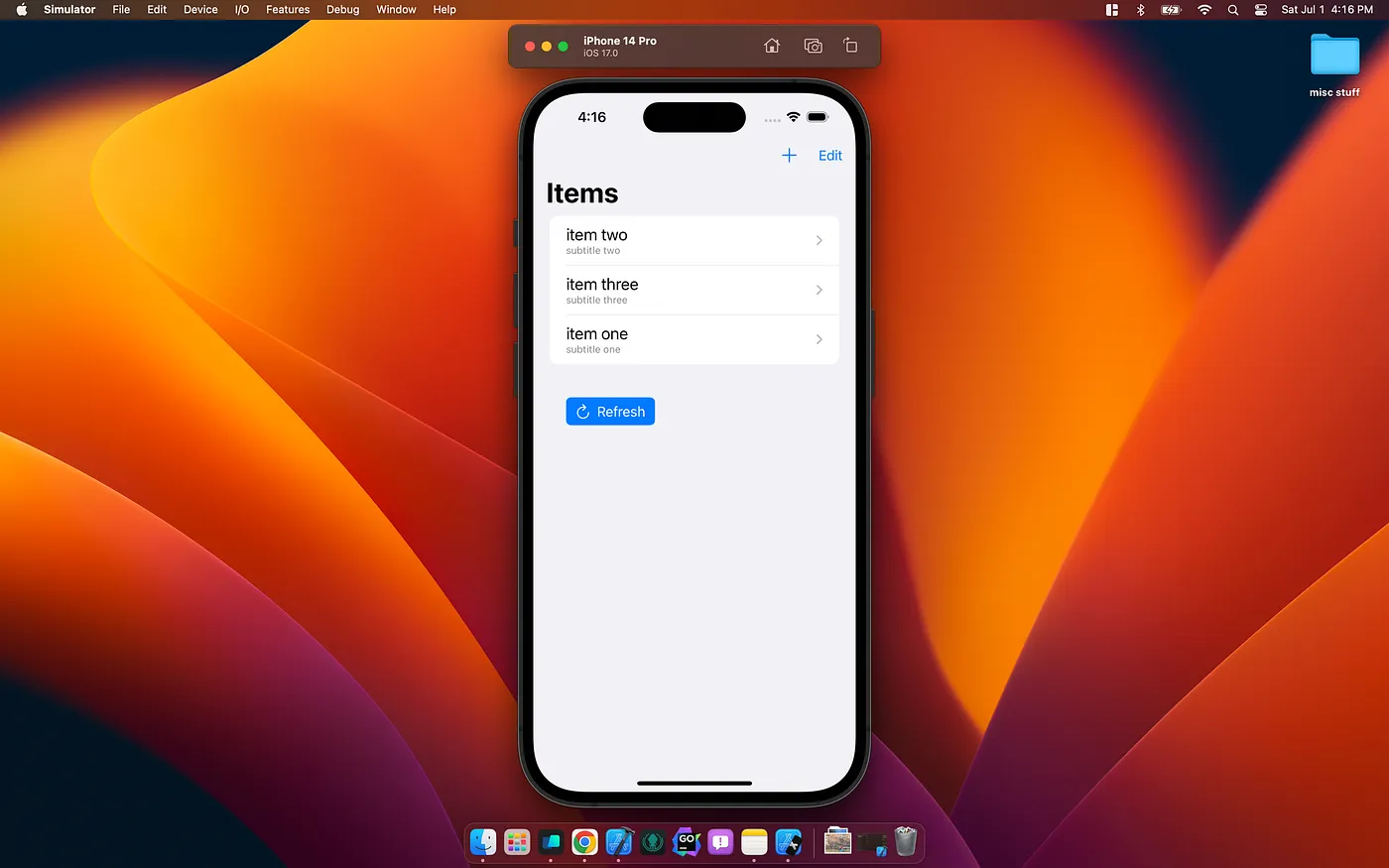
Play around creating entities and disabling the server to see the local-first data presented.
There you have it, folks! CoreData and remote data are now buds. Your users can use the app offline and sync when they return to the grid. Coffee’s ready without the grocery store trip! Cheers!
A protocol-oriented approach to HTTP networking in Swift using async/await, dependency injection, and proper error handling

A proof-of-concept for building offline-first iOS apps with Codable conforming models

Build a real-time chatroom with Vapor and SwiftUI using WebSockets